
[ v3_root ]
basicConstraints = critical,CA:TRUE,pathlen:0
keyUsage = critical,keyCertSign,cRLSign
subjectKeyIdentifier = hash

[ v3_signing ]
basicConstraints = critical,CA:FALSE
keyUsage = critical,digitalSignature,nonRepudiation
subjectKeyIdentifier = hash
authorityKeyIdentifier = keyidOptional module of the DocuSeal setup. Use it when internal validators must recognise your organisation, not DocuSeal, as the seal issuer.
1. Theory
A digital signature makes any later change to a document detectable and ties the signature to a certificate. What that certificate says about who signed depends on who issued it and what checks they made. A root CA is a self-signed trust anchor: readers trust a signing certificate only if they trust the root it chains to.
Sealing is strongly recommended for in-house e-signature. A seal cryptographically signs the entire PDF: any later change, to a date, a clause or a page, breaks it, and the reader reports the document as modified or the seal as invalid. DocuSeal and other e-signature platforms seal for this reason: the record is tamper-evident.
A seal proves the file has not been touched since it was sealed, and which certificate sealed it. It does not prove who the individual signer was. That evidence comes from the identification and consent steps, and from the audit log.
Your own root keeps you in control of the trust chain, but it is trusted only by machines that import it. If external validation is ever required, pass the root certificate to the validating party so they can build the chain.
Use two certificates, as DocuSeal’s own PKI does:
-
The root CA signs certificates and nothing else. Its private key stays offline.
-
The sealing certificate is issued by the root and is the one DocuSeal uses to seal PDFs. Its key lives in DocuSeal.
Do not upload the root key to DocuSeal. Anyone with access to that server could then issue certificates your validators trust.
2. Generate the root CA
Prerequisite: OpenSSL installed. Save as ext.cnf:
Generate the root:
openssl req -x509 -newkey rsa:3072 -nodes -keyout root.key -out root.crt -days 3650 \
  -subj "/O=Demo company/CN=Demo company Root CA" \
  -extensions v3_root -config ext.cnf

openssl x509 -in root.crt -noout -subject -dates
Keep root.key offline and out of shared locations. You need it again only to issue or renew a sealing certificate.
3. Issue the sealing certificate
The sealing certificate carries the digitalSignature and nonRepudiation key usages. PDF readers can reject a signature made with a certificate that lacks them, which is why the root itself must not be used to seal.
openssl req -new -newkey rsa:3072 -nodes -keyout signing.key -out signing.csr \
  -subj "/O=Demo company/CN=Demo company Document Sealing"

openssl x509 -req -in signing.csr -CA root.crt -CAkey root.key -CAcreateserial \
  -out signing.crt -days 1825 -sha256 -extfile ext.cnf -extensions v3_signing

openssl verify -CAfile root.crt signing.crt
The last command must print signing.crt: OK. Then move root.key to offline storage.
4. Upload the sealing certificate to DocuSeal
DocuSeal accepts a PKCS#12 (.p12/.pfx) or a DER (.der) file. Bundle the sealing key and certificate, with the root as the chain:
openssl pkcs12 -export -inkey signing.key -in signing.crt -certfile root.crt \
  -name "Demo company document sealing" -out demo-company-sealing.p12 \
  -passout pass:<P12_PASSWORD>
Use a real password for <P12_PASSWORD>. Then upload the file in DocuSeal:
-
Sign in to DocuSeal and open Settings, then E-Signature.
-
In Signing Certificates, select Upload Cert.
-
In the Upload Certificate dialog, enter a Name, choose the
.p12file in File, and enter<P12_PASSWORD>in Password (optional). -
Select Submit.
-
Select Make Default on the new certificate so DocuSeal uses it for sealing.
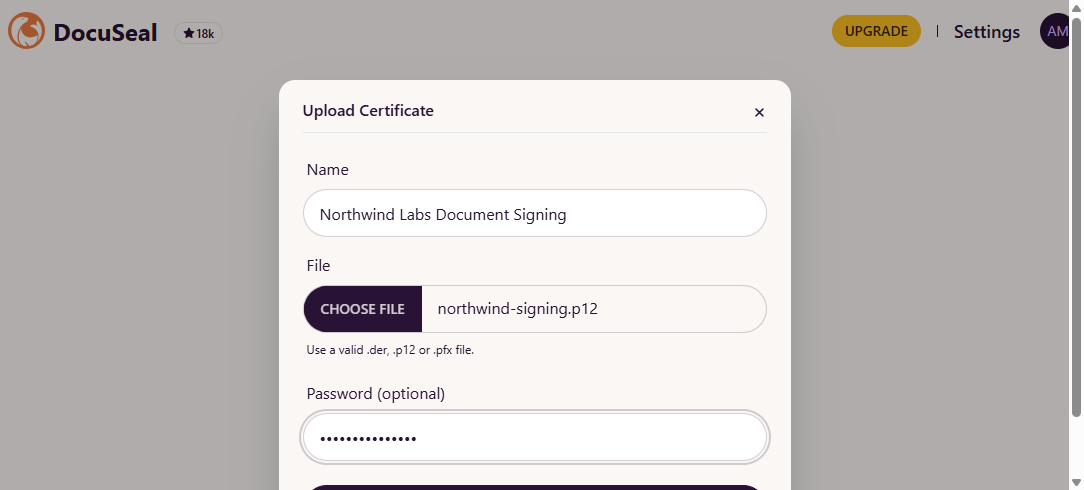
The commands above are checked with OpenSSL. This guide has not checked how DocuSeal presents a bundled chain. After uploading, seal a test document and check the chain in the verification step of the DocuSeal tutorial: it should show your sealing certificate chaining to your root.
On verifying machines, trust root.crt as a root CA so the seal shows as valid. Never distribute signing.key or root.key.
5. Maintenance and renewal
The root CA must stay available for several years, typically 10 to 15, so old signatures remain verifiable. Plan renewal before expiry: an expired root invalidates every certificate it issued. Generate a new root key pair, distribute the new root to verifying machines before the old root expires, and keep the old root trusted until documents signed under it pass their retention period.
The sealing certificate is shorter-lived, 5 years in this example. Issue its replacement from the root before it expires and make the new one the default in DocuSeal. Documents sealed earlier stay valid because the old certificate still chains to the same root.
6. Other export formats for the root certificate
Validators expect the public root certificate only:
openssl x509 -in root.crt -outform der -out root.der     # DER certificate
openssl x509 -in root.crt -noout -fingerprint -sha256    # fingerprint to publish next to it